

First impressions matter. Just like a firm handshake and a friendly smile, a well-formatted title page sets the tone for your APA 7 student research paper. A polished title page shows professionalism, organization, and attention to detail – qualities instructors notice immediately.
For APA 7 student papers (different from professional research papers), the title page neatly organizes key details about the student, course, and instructor in a simple, easy-to-read layout. Follow this step-by-step guide to make sure your title page meets APA standards and impresses your instructor.
What Goes on an APA 7 Student Paper Title Page
Here’s a checklist of the elements required on an APA 7 title page, with formatting tips for each. Remember: instructor preferences always take priority.
Formatting requirements:
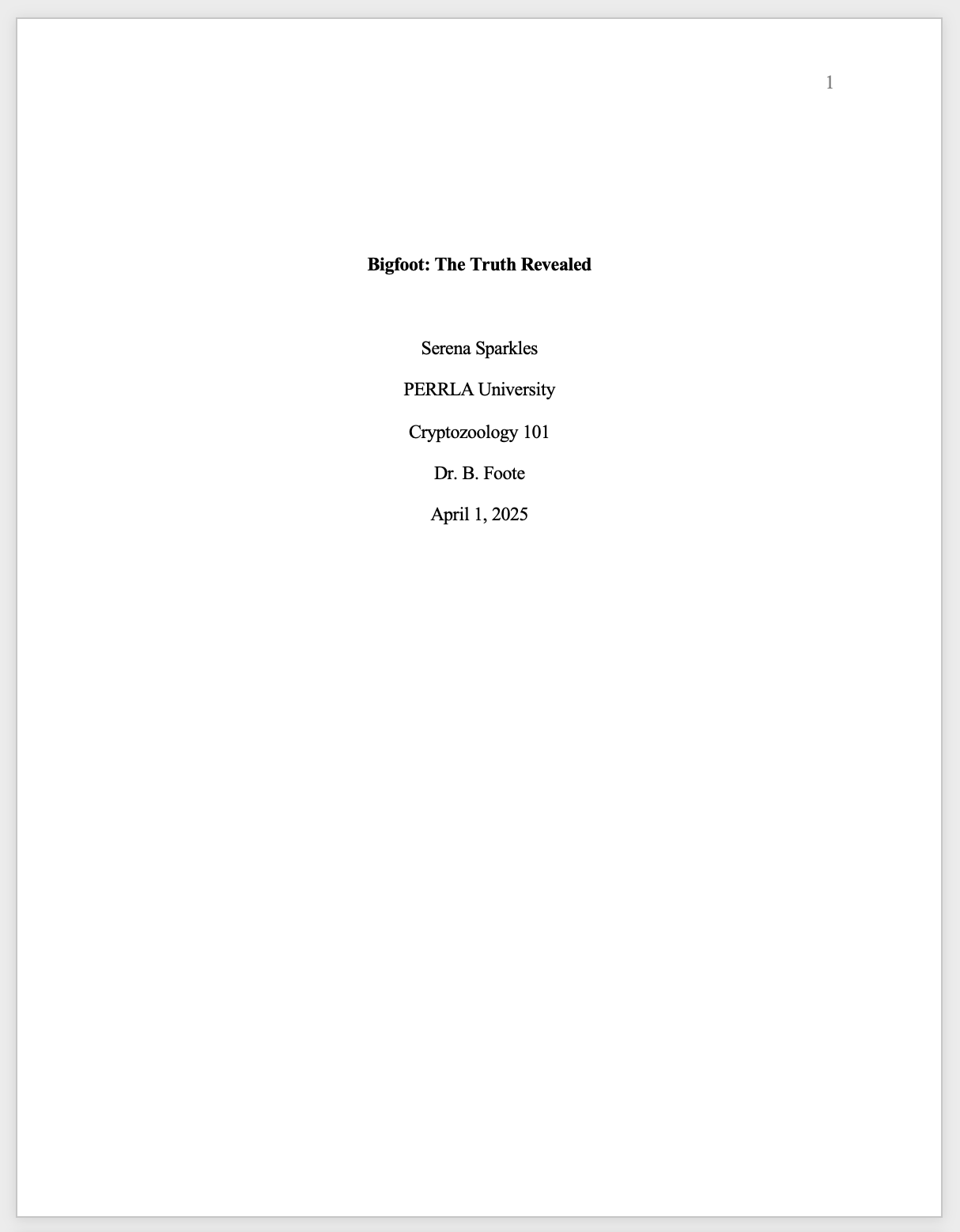
All elements should be centered and placed in the top half of the page (usually starting on the 3rd or 4th double-spaced line). Only place one item per line.
- Paper title
- Use bold and title case (capitalize all major words).
- Keep it concise and clear so the reader immediately understands your topic.
- Empty line
- Include a double-spaced blank line between the title and the author’s name.
- Author name
- Include your first name, middle initial, and last name.
- Omit degrees and titles, but include suffixes (e.g., Jr., III) if applicable.
- School or institution
- Use the full official name of your institution.
- Course
- Include the course prefix and title (e.g., PSY 101: Introduction to Psychology).
- Instructor name
- Write exactly as requested (e.g., Dr., Professor, or full name).
- Due date
- Format as Month Day, Year (e.g., April 30, 2026).
Pro Tip: Include the page number in the top-right header. APA 7 no longer requires a running head for student papers.
Common Title Page Mistakes to Avoid
Even small mistakes on your APA 7 title page can cost points. Here are the most common pitfalls:
1. Misaligned or improperly spaced elements
- Elements should be centered and in the top half of the page. Crowding or uneven spacing can make your title page look messy.
2. Incorrect capitalization
- Your title must be bold and in title case. Using sentence case or failing to bold the title is a frequent error.
3. Forgetting the empty line
- Always include a double-spaced line between your title and author name for proper APA formatting.
4. Including degrees or titles
- Stick to your name only. Excluding unnecessary details keeps your title page professional and uncluttered.
5. Inconsistent formatting for school, course, or instructor info
- Each element should be on its own line. Mixing abbreviations or punctuation can create a sloppy appearance.
6. Omitting the page number
- While the running head isn’t needed, the page number must be in the top-right corner.
7. Incorrect date format
- Use the full month, day, and year (e.g., April 30, 2026), unless your instructor specifies otherwise.
By watching out for these errors, your title page will meet APA standards and create a strong first impression.
Sample student research paper title page
Quick Tips for a Polished APA Title Page
A professional-looking title page is more than just following rules. These tips will ensure your title page stands out:
1. Stick to consistent fonts and sizes
- APA 7 recommends readable fonts like 12-point Times New Roman, 11-point Calibri, or 11-point Arial.
2. Double-check line spacing
- Every line, including the empty line, should be double-spaced. No extra spacing before or after lines.
3. Preview your layout
- Ensure your title sits in the top half of the page and looks visually balanced.
4. Keep your title concise
- Your title should clearly convey the topic without unnecessary words—think of it as a professional headline.
5. Follow instructor-specific rules
- Some instructors require extra info like course sections or unique formatting. Always check their instructions.
6. Proofread thoroughly
- Typos, missing punctuation, or formatting inconsistencies can stand out. Double-check names, dates, and course codes.
7. Use templates carefully
- Word processor APA templates can save time, but verify they meet APA 7 standards. Some templates still include the old running head.
Final Thoughts
Creating an APA 7 title page doesn’t have to be stressful. By following these step-by-step guidelines, avoiding common mistakes, and applying a few finishing touches, your title page will make a professional impression and set the stage for your entire research paper.
A well-crafted title page is your paper’s first impression—make it count!
One more thing…
If you’re using PERRLA to create your paper, then PERRLA will automatically build your title page as soon as you create your paper. All you’ll have to do is fill out a form, providing the information to include on the title page, and PERRLA will handle everything else. You can try PERRLA completely free for 7 days here.
See you soon for the next installment of our APA 101 series, when we’ll be taking a closer look at formatting the body of an APA 7 student research paper!
If you're ready to learn more about the APA, you can read through all of our APA 101 articles here.